
Hidden themes of the Freakonomics Radio Podcast

Table of contents
I. Introduction
II. Preprocessing
III. Using NLTK
IV. Latent Dirichlet Allocation
- What is LDA ?
- Our topics
- Mixed Membership
- Labelling and One Hot Encoding
- Final visualisation and results
V. Text Clustering
VI. Conclusion
I. Introduction
Wait, what is even Freakonomics Radio ?
Freakonomics Radio is a is a podcast that explores and answers common life questions by taking an economist approach upon them. It was created in 2010 by S. Dubner and S. Levitt as a spinoff to their first book together Freakonomics Since then, they wrote a few other books: SuperFreakonomics, When to rob a bank and Think like a Freak They give new insights to old questions, and are never afraid to break "common knowledge" with cold, hard facts. The subjects they tackle vary widely, from cheating during sumotori fights, to how to make the pefect pizza dough, to the state of American presidency etc. Chances are that if you're interested in anything, you'll find something about it in one of their podcasts.
The subjects ( or topics ) they address is exactly what we are going to study today. After all, it is supposed to be about the hidden side of everything, no ?
The dataset
Freakonomics Radio is a podcast available for free to everyone. It is based on user donations and can be heard directly online, through podcasts services, and on some American radio channels.
The problem for us is that podcast means audio data and converting speech-to-text. If the task isn't so hard ( anymore ), it is certainly computationally expensive, and it would take a long time considering the amount of podcasts and the weakness of my laptop.
Thankfully, this is not something we're going to have to do here as the transcripts of the podcasts are also available on the website.
To get ( most of ) these transcripts I wrote a scrapping bot that went through the archive to locate and download the transcipts of the podcasts. The reason why I wrote "most of" is because some of them were either missing, repeated ( Rebroadcasts ), or couldn't be processed properly.
Overall the bot gave me 310 transcripts of podcasts starting from February 2010 to November 2017. With the transcripts came the list of their titles, date of release, and associated tags.
Modules, questions, and goals
During this short study I will use different python modules to do Natural Language Processing (NLP) and Machine Learning including :
- gensim
- nltk
- pandas
- scikit-learn
The questions I want to answer are as follows :
- Do they really cover everything ??
- What do they talk about, what is it to Speak Like A Freak ?
- Can our algorithms generate relevant topics for each podcast ?
- What else can we do with this data ?
These questions apart, my goal here is to present an exploratory analysis of the podcasts' transcripts while explaining most of the process. The annotations on the code are here to help beginners understand what I'm doing to reuse ( parts of ) this code in their projects with a better understanding. The mathematical and technical explanations are here for anyone interested in the use of Machine Learning for NLP.
II. Preprocessing
# Importing our first modules
import pandas as pd
import os
Let's see what our data looks like :
filename = os.listdir('Corpus2')[107]
sample =open('Corpus2/'+filename,'r')
print(filename+'\n')
print(sample.read()[:1000])
We can already make a few remarks on the difference between our usual text data and transcripts :
- Names tend to appear at the beginning of new lines.
- There are new "spoken" stopwords of which we will have to get rid.
Deleting the repeating names
'''Let's take care of the repeating names

This function takes a file from Corpus2 (where our transcripts are stored),
detects and delete most of the names at the beginning of the line.
Once the data has been cleaned, it rewrites the file in a new folder under a new name.

Opens and reads the file, then separates each line.
Checks if there is a ':' in the 20 first characters of the line
If so, delete the ':' and everything that comes before it and rewrite the line in a new file
If not, write the line as it was.'''

def delete_beginning_of_line_names(filename):

    x=open('Corpus2/'+filename,'rb')
    x=x.read()
    y=x.split(b'\n')

    for nb_line,line in enumerate(y):
        line_start = line[:20]
        try:
            line_start = line_start.decode()

            if ':' in line_start:
                name = line_start.split(':')[0]
                y[nb_line]=(line[(len(name)+1):])
        except:
            pass

        with open('Corpus2_no_names/'+filename.split('.')[0]+'no_names.txt','wb') as f:
            for line in y:
                f.write(line)
                f.write(u"\n".encode("utf-8"))
        f.close()

# Once this function defined for one file, we can run it through the whole corpus as such :

#for filename in os.listdir('Corpus2'):
#    delete_beginning_of_line_names(filename)

# I'm not doing this here cause I already processed the data
# On a side note, after this step, I realized that during the scraping some files came out wrong. I decided to pluck them out
# of the data set. These files were : #192, #284, #318, #319, #94
Let's see what the new, cleaned text looks like now :
filename = os.listdir('Corpus2_no_names')[106]
sample =open('Corpus2_no_names/'+filename,'r')
print(filename+'\n')
print(sample.read()[:1000])
We can see that the deletion process 'forgot' a few names in a few lines.
Thankfully, it is not a real problem for what we are about to do. Remember, we are doing a statistical analysis of the words in all of the texts.
Outliers that appear too little or too often will be deleted during the next steps of our data preprocessing.
When it comes to deleting names in NLP, there are a few modules that do this very well. A process called Natural Entity Detection ( NER ) gives each word a token corresponding to its grammatical value. It would detect most of the names in our sentences.
But in this case, I don't want to delete all the names in my dataset as some of them could be of use or could even be the main subject ( eg : article about the Obamas). I also want to keep this study as light as possible and NER can be overwhelming and slow.
Cleaning the titles
# All of our files are inside the "Corpus2_no_names" folder, let's get their titles

def get_title(filename):
    title_notxt = filename[:-12]           # Gets rid of the "no_name.txt" at the end of the filename
    for i,ch in enumerate(title_notxt):
        if ch.isalpha():                   # Stops at the first char that is a letter
            break
        title= title_notxt[i:]             # Cuts the name properly
    title = title.replace('_',' ').strip()
    return title

# Let's try it

print(filename+'\n')
print(get_title(filename))
# Let's run this through the whole corpus :

title_list = []
for filename in os.listdir('Corpus2_no_names'):
    title_list.append(get_title(filename))
title_list[:10]
Now that we have collected all the titles in a separate list, let's do the same thing with the actual text files.
Creating the Corpus
docs={}
# The reason why we're specifying different encodings is to be sure that all the characters,
# even special ones will be properly processed.
for i,filename in enumerate(os.listdir('Corpus2_no_names')):
    try:
        x=open('Corpus2_no_names/'+filename,'r')
        docs[i]= x.read()
    except:
        x=open('Corpus2_no_names/'+filename,encoding="utf8")
        docs[i]= x.read()

# Now we can't really output this as it's too long
# Let's put it in a list format as well:

doc_complete=[]
for value in docs.values():
    temp=value
    doc_complete.append(temp)
Let's check that everything has ran properly for doc_complete. We can't output the whole list, but checking a text and the size of the list will tell us that it worked.
print(doc_complete[10][:2000])
The data is complete and intact, we can proceed to the REAL text preprocessing.
III. Using NLTK
# First we import the relevant modules :
from nltk.corpus import stopwords
from nltk.stem.wordnet import WordNetLemmatizer
import string
Stopwords issue
We will now create a list of stopword to filter in our dataset. A basic list is given by the "stopword" from nltk.corpus, but it lacks a few things and we can make some improvements.
- The character " ’ " is used in our transcript instead of the character " ' " that is used in nltk's english stopwords, so we need to update the list accordingly.
- I mentionned earlier that since transcripts were from actual discussions and not written to be read, they also come with another set of spoken stopwords that we will have to filter out from our dataset.
- Some numbers are written in text, they are also not relevant to our text study.
- There is also some vocabulary specific to freakonomics that we consider not te be relevant to detecting the subject of each article.
stopword = stopwords.words('english')
stopword[-20:]
# Dealing with the apostrophe issue

for word in stopwords.words('english'):
    if "'" in word:
        x = word.replace('\'','’')
        stopword.append(x)

# Here are list of all the cases we spoke about earlier
extra_stopwords = ['–','would','like','people','think','know','that’s','really',
        'i’m','there\'s','yeah','oh','there’s','we’ll','we’ve','‘it’s','i’d','can’t',
        'they’re','i’ll','we’re']

numbers = [ 'one','two','three','four','five','six','seven','eight','nine','ten',
          '1','2','3','4','5','6','7','8','9']

spoken=['whoa','hey','hi','oh','wow','ok','okay','boo','boo…who','…']

freako_voc=['dubner','stephen','blog','levitt','freakonomics','freakonomic','podcast','podcasts','episode','episodes','previous',
           'transcript','episode','radio','broadcast','rebroadcast','archive','llc']

# Let's update our current stopwords list

stopword = stopword + extra_stopwords + numbers + spoken + freako_voc
All of that worked properly, let's transform the list to a set and add another set to filter out punctuation, with more extra characters.
stop=set(stopword)

exclude = set(string.punctuation+'—'+'“'+'”'+'…') # The characters I'm adding here are some "special" ones I found in the text
Lemmatization
Now to clean each of our documents, we will go through them word by word, deleting the words that are in our stopword set and characters by characters deleting the characters in our exclude set.
Then we pass each word throuh a lemmatizer.
I know, it's an awful word and it sounds like a lot but it isn't actually that complicated, bear with me.
This what Wikipedia has to say about Lemmatization :
Lemmatisation (or lemmatization) in linguistics is the process of grouping together the inflected forms of a word so they can be analysed as a single item, identified by the word's lemma, or dictionary form.
In human speech : A lemmatizer transforms a word back to its "root" word.
For example :
- Learning -> Learn
- Presidents -> President
This way, words that were plurals, or verbs that were conjugated are formated the same way.
While this step does lose us some temporal and quantity information ( when and how many ), we are keeping the semantic value of the words, and in the case of topic modeling, this is what matters the most.
lemma = WordNetLemmatizer()

# Defining our cleaning function for each document
def clean(doc):
    stop_free = " ".join([i for i in doc.lower().split() if i not in stop])
    punc_free = ''.join(ch for ch in stop_free if ch not in exclude)
    # added for thorough cleaning after punctuation gone
    stop_free2 = " ".join([i for i in punc_free.split() if i not in stop])
    normalized1 = " ".join(lemma.lemmatize(word,pos='v') for word in stop_free2.split())
    # added for correct lemmatization of nouns
    normalized2 = " ".join(lemma.lemmatize(word,pos='n') for word in normalized1.split())
    # added for cleaning of lemmatized words
    normalized = " ".join([i for i in normalized2.split() if i not in stop])
    return normalized

# Let's try it for size
clean(doc_complete[10][:2000])
Above is what the document looks like after it has been cleaned and lemmatized. To this, we can see that we could also clean more numeric characters out of the document, and maybe some measures such as "miles", "pounds", and others. Let's assume that they won't be too common and that they will be filtered out in the next steps.
For computing reasons, keeping our documents as long strings isn't the best option to process them. What we like to do is tokenize them. Then again, an hard word for an easy concept. We simply split the cleaned document in tokens. A token is a word in the text. It's as simple as this.
# Example of tokenization for our example document :
doc_clean = [clean(doc).split() for doc in doc_complete]
doc_clean[10][:20]
Great !
We put all the words as single items in a big list so that our next processing step will be able to count them and to rank them accordingly.
Bag of Words
# Let's import gensim for the topic modelling
from gensim import corpora
import gensim.models
# Creating the term dictionary of our corpus, where every unique term is assigned an index.
dictionary = corpora.Dictionary(doc_clean)

# As I mentionned previously, we're gonna filter out terms that appear too much, or too often.
# Here we'll count no term that appear in less than 10 articles
# and no term that appears in more than 70% of the articles
dictionary.filter_extremes(no_below=10, no_above=0.7)


# Converting list of documents (corpus) into Document Term Matrix using dictionary prepared above.
doc_term_matrix = [dictionary.doc2bow(doc) for doc in doc_clean]
There is a lot of things happening in a few lines of code above here, let me explain.
The first step is to create a dictionary of all the words in all the transcripts, whether they appear a lot, or not. To do this we use all of our tokenized documents and create a new entry in the dictionary every time a new word appears.
The second step is to filter out the extremes. The assumption behind this is that words that appear too often in too many documents have little semantic meaning, and those that appear not frequently enough won't bear any weight in the computations that will follow. For the words that do not fit in our filtering criteria, their entries are removed.
In the dictionary, each word is associated to an id number ( entry number ).
Let's take a simple example before moving forward. I'll use two sentences from real life as my "documents" and show what the corresponding dictionary will be.
Sentence1 : "Sally likes petting dogs"
Sentence2 : "Sallo likes eating dogs"
Well that took a strange turn...
All the different words in Sentence1 and Sentence 2 are : Sally, Ariel, likes, eating, petting, and dogs. These will be our columns. This is our dictionary !
| Sally | Sallo | likes | eating | petting | dogs |
|---|---|---|---|---|---|
After counting the words in both sentences, we get our Bag of Words representation :
| Sentence | Sally | Sallo | likes | eating | petting | dogs |
|---|---|---|---|---|---|---|
| Sentence1 | 1 | 0 | 1 | 0 | 1 | 1 |
| Sentence2 | 0 | 1 | 1 | 1 | 0 | 1 |
For the sake of the example's simplicity, I kept the words as they were but as I mentionned earlier they could have been replaced by an id (Sally=1, Sallo=. etc. ). I also didn't have to do any filtering on these sentences, then again to keep it simple.
This way a whole transcript can be "summed up" by a row of numbers corresponding to how many times words appear in that transcript.
Let's take an example on our data :
example = doc_term_matrix[10]
example[:20]
The number on the right side represents a number id for a unique word, and the number on the left side represents how many times this unique word appeared in the document.
Let's see which word id appeared the most in this document :
example = sorted(example, key=lambda tup: tup[1])
example[-10:]
That means the word with the id 1454 apeared 50 times in the document, the word with the id 914 appeared 12 times in the document, etc. Let's check the meaning of these ids.
for tup in example[-10:]:
    w_id, nb = tup
    for word, word_id in dictionary.token2id.items():
        if word_id == w_id:
            print ("The word \"{}\" appears {} times in the document.".format(word,nb))
That means that in this document, the words language appeared 50 times !
Even before processing the data more thoroughly we can almost be certain that this document is going to be about language.
IV. Latent Dirichlet Allocation
What is LDA ?
As I was looking for a simple way to explain the mathematics behind LDA I came upon an article that does it very well and that keeps the math required to understand as simple as possible. You can find this article here and read it all if you are interested but if you want to get down to it quickly here is a snippet from the article :
Say we’ve got a collection of documents, and we want to identify underlying “topics” that organize the collection. Assume that each document contains a mixture of different topics. Let’s also assume that a “topic” can be understood as a collection of words that have different probabilities of appearance in passages discussing the topic. One topic might contain many occurrences of “organize,” “committee,” “direct,” and “lead.” Another might contain a lot of “mercury” and “arsenic,” with a few occurrences of “lead.” (Most of the occurrences of “lead” in this second topic, incidentally, are nouns instead of verbs; part of the value of LDA will be that it implicitly sorts out the different contexts/meanings of a written symbol.)
Of course, we can’t directly observe topics; in reality all we have are documents. Topic modeling is a way of extrapolating backward from a collection of documents to infer the discourses (“topics”) that could have generated them. (The notion that documents are produced by discourses rather than authors is alien to common sense, but not alien to literary theory.) Unfortunately, there is no way to infer the topics exactly: there are too many unknowns. But pretend for a moment that we had the problem mostly solved. Suppose we knew which topic produced every word in the collection, except for this one word in document D. The word happens to be “lead,” which we’ll call word type W. How are we going to decide whether this occurrence of W belongs to topic Z?
We can’t know for sure. But one way to guess is to consider two questions. A) How often does “lead” appear in topic Z elsewhere? If “lead” often occurs in discussions of Z, then this instance of “lead” might belong to Z as well. But a word can be common in more than one topic. And we don’t want to assign “lead” to a topic about leadership if this document is mostly about heavy metal contamination. So we also need to consider B) How common is topic Z in the rest of this document?
Ted Underwood
As an input, using the LDA as implemented in gensim, we can ask for a number of topics and as an output it will give us an LDA model that was fitted to our dataset.
Our topics will be described as a list of words where each words will have a probability of appearance attached to it.
# I wont be running the LDA on the notebook as it takes a bit of time.
# Instead, I saved my lda model from a  previous computation and I will load it in the next box.

Lda = gensim.models.ldamodel.LdaModel
# Running and Trainign LDA model on the document term matrix.
#lda_model = Lda(doc_term_matrix, num_topics=10, id2word = dictionary, passes=100)
Our topics
# Loading the computed model
#lda_model.save('lda_10topics_notebook2.model')
lda_model=Lda.load('lda_10topics_notebook2.model')
lda_model.print_topics(5) # print 5 random topics amongst the 20
That might be a bit much right now, let's present this in a more understandable way :
import numpy as np

topics_matrix = lda_model.show_topics(formatted=False, num_words=5, num_topics=10)
topics_matrix[0]

for topic_raw in topics_matrix:
    topic_id, word_list = topic_raw
    print("Topic #{} : ".format(topic_id))
    topic_words = []
    for tupl in word_list:
        word, cer = tupl
        topic_words.append(word)
    print(topic_words)
    print()
Some of the subjects found by the LDA are very clear :
- Topic #7 that is obviously about healthcare.
- Topic #5 that is obviously about politics and government.
But some of them are more... mysterious :
- Topic #6 : sleep, data, decision, economics, word.
- Topic #1 : market, kidney, mattress, line, shoe.
Mixed Membership
LDA is what is called a mixed membership model. That means that our documents can belong to several topics at the same time.
For example, a document could be about sports and health, or any combination of our previously generated topics.
First of all we are going to see how well the "main" topic describes one of our documents. Under a certain threshold of description we'll explore the other topics of the document.
If you are familiar with the machine-learning vernacular, this is also what we call "soft-clustering" where a single entity can be part of multiple groups. We will later use the clustering algorithm K-Means to do some "hard-clustering" and assign each podcast to a unique cluster/class.
Naming our topics
: 'language', 'car', 'country', 'drive', 'energy' -- International
: 'market', 'kidney', 'mattress', 'line', 'shoe' -- Consumerism
: 'president', 'vote', 'power', 'political', 'election' -- Politics
: 'play', 'lottery', 'game', 'save', 'player' -- Games&Savings
: 'kid', 'family', 'parent', 'child', 'follow' -- Family
: 'government', 'country', 'system', 'technology', 'city' -- Government
: 'sleep', 'data', 'decision', 'economics', 'word' -- No idea for this one, Miscellaneous
: 'health', 'doctor', 'patient', 'medical', 'care' -- Healthcare
: 'food', 'eat', 'restaurant', 'tip', 'prize' -- Food
: 'school', 'kid', 'city', 'student', 'crime' -- Education
#Prior to creating our dataframe, let's name all the topics
topic_list = ['International',
              'Consumerism',
              'Politics',
              'Games&Savings',
              'Family',
              'Government',
              'Miscellaneous',
              'Healthcare',
              'Food',
              'Education']
# 1 will be joined with 4 ( both are Misc.)
topic_list[3]
import numpy as np
topic_df = pd.DataFrame(0.0,index=np.arange(len(doc_term_matrix)),columns=['topic','membership'])

for i, doc in enumerate(doc_term_matrix):
    result=lda_model[doc]
    top, cer = max(result,key=lambda item:item[1])
    topic_df.iloc[i]['topic']= top
    topic_df.iloc[i]['membership']= cer

topic_df.head(10)
topic_df.describe()
That is not too bad considering that 75% of the data has a membership of almost 50% to just one topic.
Let's put a threshold at 75%. That means that every document with a main membership of less than 75% will be detailed more thoroughly.
# We redifine our topic_df according to the threshold we have decided.
def get_topic(docid):
    doc = doc_term_matrix[docid]
    topic_distrib = lda_model.get_document_topics(doc)
    topic_distrib = sorted(topic_distrib, key=lambda tup: tup[1])
    topic_distrib.reverse()
    top_list = []
    cer = 0
    for tupl in topic_distrib:
        top, a = tupl
        if cer <= 75:
            top_list.append(top)
            cer += round(a,3)*100
        else:
            break

    return top_list, cer

print(title_list[10])
top5, mem = get_topic(10)
for i in top5:
    print(topic_list[i])
print(mem)
That gives us a good description of all the subjects addressed by a single document.
In a next part, we are going to divide our dataset in two. One where the membership is naturally above 75% for one subject, and one where we have a mixed memebership that we will make more explicit via the use of the function defined above.
topic_solo = topic_df[topic_df['membership'] >= 0.75]
topic_mixed = topic_df[topic_df['membership'] < 0.75]
print(topic_mixed.describe())
print(topic_solo.describe())
Let's plot both of these dataframes in a pie plot to see which are the most common topics tackled by the Freakonomics Radio podcats.
labels=topic_list
sizes=[]

for i in range(10):
    sizes.append(topic_solo[topic_solo.topic == i].count()[0])

import matplotlib.pyplot as plt


fig1, ax1 = plt.subplots()
ax1.pie(sizes, labels=labels, autopct='%1.1f%%',
        shadow=True, startangle=90)
ax1.axis('equal')  # Equal aspect ratio ensures that pie is drawn as a circle.

plt.show()

The topics the most present are unsurprisingly the ones that were not as well defined as the others ( Misc. and Games&Savings ).
Government and Politics can be added to represent 18.3% of the documents above 75% membership to one model.
We can do the same thing for Family and Education ( that often goes hand in hand ) to get 14.6%.
topic_mixed.head()
Labelling and One Hot Encoding
Labelling
It is the simple process of replacing anything in categorical data by a number. We are putting number labels on our data.
Wait...What is categorical data ? I'm glad you asked, let's see what Wikipedia has to say about it :
In statistics, a categorical variable is a variable that can take on one of a limited, and usually fixed, number of possible values, assigning each individual or other unit of observation to a particular group or nominal category on the basis of some qualitative property.
If that didn't do it for you, a tuned down explanation would be that categorical data represent groups or categories.
- For example : if we were classifying people in a classroom depending on their hair color and height, hair color would be categorical, and height would be numerical. Hair color can be grouped in 4 categories ,brown, black, blond, ginger ( don't get upset, I'm colorblind). While height will take continuous values.
| Student Name | Hair Color |
|---|---|
| Bob | Blond |
| Barb | Brown |
| Ben | Black |
| Belle | Ginger |
A wrong intuition would be that categorical data has to be textual. But a category could be as well described by a number as it would be described by a string.
If we were to say :
- brown = 0
- black = 1
- blond = 2
- ginger = 3
We could still describe the hair color of our example by reporting the number to the values we set.
We would get this :
| Student Name | Hair Color |
|---|---|
| Bob | 2 |
| Barb | 0 |
| Ben | 1 |
| Belle | 3 |
Reminds you of anything ? This is labelling ! This is exatcly what we've done so far with our topics. Each topic was represented by a number and we could check what it actually was when referring to the table we set.
They are great in order to keep our data nice and simple. We don't want to see numbers mixing with texts and whatnot. Labelling our topics is a great simplification tool for a lot of things and so far it has helped us to show the data in a simple manner but it doesn't prove as useful when it comes to show that one item belongs in multiple categories.
In the case of our podcasts, what if a podcast is both about "Food" and "Politics" ? Since all the categories are showed in one column, they can't possibly represent the mixed-membership of our podcasts.
For this, we have a better option...
One Hot Encoding ( for categorical data )
It is also a way to represent our categorical data with a twist. Instead of putting all the categories under one column, each category will become its own column. If the datapoint belongs to one of the categories, we will set the value of this point to 1 in the corresponding column, if not, we will set its value to 0.
Following our previous example, we would go from :
| Student Name | Hair Color |
|---|---|
| Bob | Blond |
| Barb | Brown |
| Ben | Black |
| Belle | Ginger |
To this One Hot Encoding representation :
| Student Name | Blond | Brown | Black | Ginger |
|---|---|---|---|---|
| Bob | 1 | 0 | 0 | 0 |
| Barb | 0 | 1 | 0 | 0 |
| Ben | 0 | 0 | 1 | 0 |
| Belle | 0 | 0 | 0 | 1 |
Belle isn't really happy that I said she was Ginger. Indeed she states that her hair is Auburn, and from what I know it's a mix between Ginger and Brown, right ? We have an example of mixed-membership right here, and we can rewrite our table this way :
| Student Name | Blond | Brown | Black | Ginger |
|---|---|---|---|---|
| Bob | 1 | 0 | 0 | 0 |
| Barb | 0 | 1 | 0 | 0 |
| Ben | 0 | 0 | 1 | 0 |
| Belle | 0 | 1 | 0 | 1 |
Hopefully at this point you understood how we are going to use One Hot Encoding to show that our podcasts can belong to multiple categories. The code that follows shows a few examples that will help solidify your understanding in our practical case.
from sklearn.preprocessing import OneHotEncoder, LabelEncoder
label_encoder = LabelEncoder()
integer_encoded = label_encoder.fit_transform(topic_mixed.topic.values)
print(integer_encoded)
onehot_encoder = OneHotEncoder(sparse=False)
integer_encoded = integer_encoded.reshape(len(integer_encoded), 1)
onehot_encoded = onehot_encoder.fit_transform(integer_encoded)
print(onehot_encoded)
hot_topics = pd.DataFrame(data=onehot_encoded, columns=topic_list)
hot = topic_mixed.join(hot_topics)
hot.head()
for j,i in enumerate(hot.index):
    top_list, mem = get_topic(i)
    hot.loc[i]['membership'] = mem
    #print(hot.iloc[j]['membership'])
    for num in top_list:
        hot.iloc[j][2+num]=1.0
hot.drop('topic', axis=1, inplace=True)
hot.head()
We have finally managed to describe the entirety of our dataset with a compounded membership above 75%.
Let's plot the pie graph for the mixed membership dataframe, compare with the solo membership dataframe and then mix them both into one single pie chart to get an overall view.
sizes=[]
for i in range(10):
    sizes.append(hot.iloc[:,1+i].value_counts()[1])

import matplotlib.pyplot as plt


fig1, ax1 = plt.subplots()
ax1.pie(sizes, labels=labels, autopct='%1.1f%%',
        shadow=True, startangle=90)
ax1.axis('equal')  # Equal aspect ratio ensures that pie is drawn as a circle.

plt.show()

Quite interestingly, once we take into account the mixed membership factor, the proportions of each topic inside the corpus change drastically. After all, maybe the Freakonomics Podcast do talk about everything ?
from sklearn.preprocessing import OneHotEncoder, LabelEncoder
label_encoder = LabelEncoder()
integer_encoded = label_encoder.fit_transform(topic_df.topic.values)
print(integer_encoded)
print(integer_encoded.shape)
onehot_encoder = OneHotEncoder(sparse=False)
integer_encoded = integer_encoded.reshape(len(integer_encoded), 1)
onehot_encoded = onehot_encoder.fit_transform(integer_encoded)
print(onehot_encoded)
Now there was a mistake that I made earlier that we can fix here.
When I took into account the mixed membership model, I gave the same weight to all the topics that composed a document. As we have seen earlier, for a single document each topic comes with a membership ratio. That seems like a perfect measure to put weights on the topics to give a better representation of all the subjects.
I made a judgement call to keep all the topics with a single membership equal or above 75% to a value of one to increase the importance of single topic documents.
ohc_topics = pd.DataFrame(data=onehot_encoded, columns=topic_list)
topic_encoded = topic_df.join(ohc_topics)
topic_encoded.drop('topic', axis=1, inplace=True)
topic_encoded.head()

for j,i in enumerate(topic_encoded.index):
    if topic_encoded.loc[i]['membership'] <0.75:
        doc_top = lda_model.get_document_topics(doc_term_matrix[i])
        for tup in doc_top:
            top, mem = tup
            topic_encoded.iloc[j][1+top]=mem
            topic_encoded.loc[i]['membership'] = 1.0

topic_encoded.head()
By mixing our single membership model and our mixed membership model into one dataframe, we can now have the most accurate representation of the distribution of the topics we found thanks to the LDA and the weighted membership.
Final visualisation and results
sizes=[]
for i in range(10):
    sizes.append(topic_encoded.iloc[:,i+1].sum())

import matplotlib.pyplot as plt


fig1, ax1 = plt.subplots()
ax1.pie(sizes, labels=labels, autopct='%1.1f%%',
        shadow=True, startangle=90)
ax1.axis('equal')  # Equal aspect ratio ensures that pie is drawn as a circle.

plt.show()

Results, and possible improvements
- Education comes out as the most frequent topic.
- If we put Government and Politics together, they become the most frequent topic with 20.6%.
A few problems arose with the classification using LDA:
- Difficulty to give a relevant topic title to the word vectors we got.
- Miscellaneous reprensents 16% of all our documents without giving any more information.
- Topics are sometimes confused such as "Games&Savings"
Solutions
A first approach could be to try to increase the number of topics that LDA is trying to generate.
Increasing the number of passes to make the generated topics more relevant.
With these two solutions come an increased computational cost. Since I'm running this whole thing solely on my laptop, I'm not sure this would be the best solution...
Thirdly, we could isolate the problematic topics that we got such as "Games&Savings" and "Miscellaneous" and run the LDA only on these documents to possibly get subsets of topics that would described the forementionned topics more thoroughly.
A last solution could be to try other algorithms for topic modelling.
Apart from LDA there are two other common techniques that are used : LSI, and Clustering.
LSI is mathematically simpler to explain than LDA but harder to interpret, as such, we'll only explore clustering here.
V. Text Clustering
After trying the gensim tools offline to generate a tf-idf matrix from my corpus, I wasn't really satisfied with the outuput, for this reason I decided to switch to the sklearn library and its TfidfVectorizer.
Tf-Idf document representation
Because of how the LDA is computed, we had to use the BoW model : LDA only accepts integers in its computation. But for what we are about to do, there is a better representation for our documents by giving a weight to each point depending on their frequency inside the document, and inside the whole corpus. That's the tf-idf matrix.
tf stands for term frequency, how often a word appears in a given document. So if a word appears a frequently in a document, its tf value will be higher for this document.
It is computed as such : $$ tf(word,doc) = \frac {\text {how many times 'word' appears in doc}}{\text {total number of words in doc}} $$
idf stands for inverse document frequency. For a given word from the dictionary, it gives us the inverse of the frequency of this word appearing in the corpus. That means that if the word is common to most of the documents his idf value will be smaller and reduce its weight.
Also, it's logarthimically scaled, just 'cause.
It is computed as such : $$ idf(word) = log( \frac { \text {total number of documents}}{\text {number of documents where 'word' appears}}) $$
Then the tf-idf weight for each word in the dictionary for each document in the corpus is the product of the two :
$ tf-idf(word,doc) = tf(word,doc)*idf(word) $
This new representation of the corpus gives us a more refined weight than simple integer counts. With these new weights, we are now able to compute a better distance and thus a better similarity between our documents.
Document Similarity
There are many ways to define similarity between two objects in mathematics. The most common way is to take the euclidian distance between the representation of these two points.
For two points A, B in an N-dimensional space, $$ \text {dist(A,B) = } \sqrt{\sum_{i=1}^N (A_i-B_i)²}$$
Where $ A_i $ and $ B_i $ respectively represent the i-th coordinate of A, and B.
We can generalize the notion of distance and use the Minkowski distance :
$$ \text {Mink}_n(A,B) = \sqrt[n]{\sum_{i=1}^N |A_i-B_i|^n}$$
We can see that Euclidian distance is a case of Minkowski distance where n = 2.
In our case, the points are our documents, and the coordinates of each document are the weights associated to each word in the tf-idf matrix. K-Means clustering typically uses Euclidian distance to measure similarity between points.
But there one last measure I would like to introduce ( as we are going to use it later ), the cosine similarity.
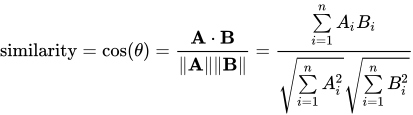
Wikipedia is actually quite clear for this one :
The resulting similarity ranges from −1 meaning exactly opposite, to 1 meaning exactly the same, with 0 indicating orthogonality (decorrelation), and in-between values indicating intermediate similarity or dissimilarity.
For text matching, the attribute vectors A and B are usually the term frequency vectors of the documents. The cosine similarity can be seen as a method of normalizing document length during comparison.
In the case of information retrieval, the cosine similarity of two documents will range from 0 to 1, since the term frequencies (tf-idf weights) cannot be negative. The angle between two term frequency vectors cannot be greater than 90°.
With that in mind, we conclude :

That will be yet another way to calculate if the topics tackled by our podcasts are similar ( use the same semantically meaningful words ).
def tokenize_clean_and_lem(doc):
    token_list = clean(doc).split()
    return token_list


from sklearn.feature_extraction.text import TfidfVectorizer

'''
max_df and min_df are the same filtering terms as we used previously when creating the dictionary.
stop_words doesn't need to be updated as our tokenize_clean_and_lem function takes care of it.
'''

tfidf_vectorizer = TfidfVectorizer(max_df=0.8, max_features=200000,
                                 min_df=0.2, stop_words='english',
                                 use_idf=True, tokenizer=tokenize_clean_and_lem)

tfidf_matrix = tfidf_vectorizer.fit_transform(doc_complete) #fit the vectorizer to synopses

print(tfidf_matrix.shape)
K-Means and our Clusters
K-Means is an unsupervised learning clustering algorithm.
Let's divide this and explain the important words.
Unsupervised learning means that it is working on unlabelled data, indeed so far we only have the description of each document through its tf-idf values.
Clustering algorithm means that the goal of this algorithm is to create clusters ( groups ) of similar points. The definition of similarity in the version of K-Means that we are using here will be euclidian distance between the tf-idf values of the documents.
As I mentionned earlier it is also a hard-clustering algorithm, meaning that contrary to the results we previously had, the will be no mixed-membership, a point will be associated with only one cluster.
We've seen earlier that tf-idf gives us a weighted representation of each document of the corpus depending on the ( semantically relevant ) words it uses. Calculating the distance between two documents using this representation will tell us if the use the same words a lot or not. From this, we will assume a similarity in the topic as well. As an input we ask for 10 clusters that will correspond to our 10 topics.
from sklearn.externals import joblib
from sklearn.metrics.pairwise import cosine_similarity
from sklearn.cluster import KMeans

terms = tfidf_vectorizer.get_feature_names()

dist = 1 - cosine_similarity(tfidf_matrix)

num_clusters = 10

#km = KMeans(n_clusters=num_clusters)

#km.fit(tfidf_matrix)

#No need to do this here, I haved saved a previous version

#km = joblib.dump(km,'kmeans_model.pkl')
km = joblib.load('kmeans_model.pkl')
clusters = km.labels_.tolist()
order_centroids = km.cluster_centers_.argsort()[:, ::-1]

for i in range(num_clusters):
    print("Cluster %d words : \n" % i, end='')
    topic_words = []
    for ind in order_centroids[i, :6]: #replace 6 with n words per cluster
        topic_words.append(terms[ind])
    print(topic_words,'\n')
Naming our clusters
import matplotlib.pyplot as plt
import matplotlib as mpl

from sklearn.manifold import MDS

MDS()

# convert two components as we're plotting points in a two-dimensional plane
# "precomputed" because we provide a distance matrix
# we will also specify `random_state` so the plot is reproducible.
mds = MDS(n_components=3, dissimilarity="precomputed", random_state=1)

pos = mds.fit_transform(dist)

xs, ys, zs = pos[:, 0], pos[:, 1], pos[:, 2]

cluster_names = {0: 'Games&Sports',
                 1: 'Lifestyle/Social',
                 2: 'Personnal Finance',
                 3: 'Freakonomics&Misc',
                 4: 'Transportation&Ecology',
                 5: 'Politics',
                 6: 'Family&Education',
                 7: 'Healthcare',
                 8: 'Food',
                 9: 'Government'}


#create data frame that has the result of the MDS plus the cluster numbers and titles
df = pd.DataFrame(dict(x=xs, y=ys, z=zs, label=clusters, title=title_list))

df.head()
Multi Dimensional Scaling Visualisation
import plotly
from plotly.offline import iplot, init_notebook_mode
from plotly.graph_objs import Scatter3d, Layout, Figure
init_notebook_mode(connected=True)

l = []

for i in range(10):
    trace= Scatter3d(
        x= df[df['label']==i]['x'],
        y= df[df['label']==i]['y'],
        z= df[df['label']==i]['z'],
        mode= 'markers',
        marker= dict(size= 7,
                    line= dict(width=1),
                    color= i,
                    colorscale='Viridis',
                    opacity= 0.8),
        name = cluster_names[i],
        text= df[df['label']==i]['title'],# The hover text goes here...
        hoverinfo = 'text+name')

    l.append(trace)

layout= Layout(
    title= '3D Representation of our topics and podcasts using MDS',
    hovermode= 'closest',
    showlegend= True)

fig= Figure(data=l, layout=layout)
plotly.offline.iplot(fig)
#plotly.offline.plot(fig)
Interpretation and interactivity
The result comes out as a big blob that might seems confused in the beginning.
"Freakonomics&Misc." represents the widest part of our topic distribution and since it is pretty general, it may extend in our representation to a lot of places.
Yet, the color coding and interactivity of the graph allows us to see the topics clusters more clearly.
You can play with the different clusters and see for example that the "Food" group is ( almost ) entirely separated from the "Government" group etc.
Improvement ?
Let's assume that the clustering has worked properly. MDS is not the only solution we have to represent multidimensional data in a reduced space.
In one of my previous projects, I used PCA and autoencoders to reduce the dimmensionality of a complex dataset.
I will only show the results for PCA with a linear kernel here for two reasons.
- After trying to do dimmensionality reduction via an AE (offscreen), it proved to be unefficient in our problem.
- I tried a few kernels offscreen for the PCA and the difference in output was minimal, so let's keep it simple.
Principal Component Analysis Visualisation
from sklearn.decomposition import KernelPCA

X = tfidf_matrix.toarray()

kpca = KernelPCA(n_components = 3, kernel = 'linear')
X_PCA = kpca.fit_transform(X)

xs = X_PCA[:,0]
ys = X_PCA[:,1]
zs = X_PCA[:,2]
# Recreating the df with the new coordinates
df = pd.DataFrame(dict(x=xs, y=ys, z=zs, label=clusters, title=title_list))

l = []

for i in range(10):
    trace= Scatter3d(
        x= df[df['label']==i]['x'],
        y= df[df['label']==i]['y'],
        z= df[df['label']==i]['z'],
        mode= 'markers',
        marker= dict(size= 7,
                    line= dict(width=1),
                    color= i,
                    colorscale='Viridis',
                    opacity= 0.8
                   ),#name= y[i],
        name = cluster_names[i],
        text= df[df['label']==i]['title'],# The hover text goes here...
        hoverinfo = 'text+name')

    l.append(trace)

layout= Layout(
    title= '3D Representation of our topics and podcasts using PCA',
    hovermode= 'closest',
    showlegend= True)

fig= Figure(data=l, layout=layout)
plotly.offline.iplot(fig)
#plotly.offline.plot(fig)
Remarks
This representation is a bit more spread out and shows an interesting distribution of the datapoints.
- The "nose" that contains all the food-related podcasts spreads far away from the rest. It shows that they are the podcasts with the highest dissimilarity from the other podcasts.
- The denser part of the representation takes a triangle from with at each of its tips a different topic :
- Family&Education
- Games&Sports
- Personnal Finance
- The "Freakonomics&Misc." category is more centered than it was before, and spreads to "Family&Education" and "Games&Sports", suggesting an actual mixed membership that we can't compute using K-Means.
- It is interesting to observe the closest points in two different clusters. For example, the closest points between the "Food" cluster and the "Healthcare" cluster is named "The Power of Poop", I'll let you think on that...
Topic Distribution
sizes = list(df.label.value_counts().sort_index().values)

fig1, ax1 = plt.subplots()
ax1.pie(sizes, labels=cluster_names.values(), autopct='%1.1f%%',
        shadow=True, startangle=90)
ax1.axis('equal')  # Equal aspect ratio ensures that pie is drawn as a circle.

plt.show()

Considering that the category "Freakonomics&Misc" represents almost a quarter of our pie chart, this can't be considered a great representation for the distribution.
Just like previously, there are a few solutions to improve the result :
- Increase the number of clusters
- Find the optimal number of clusters using silhouette or the elbow method with WCSS
- Maybe playing with different definitions of distance and see the output
Some things still stand out though :
- Family&Education is still a strong topic
- So is Government and Politics
- Food is sensibly the same, and considering the distance of the Food cluster relative to the other, we can assume that the podcasts with the Food topic use a very different vocabulary than the podcasts covering other topics.
Hierarchical Clustering
Much like K-Means, our HC algorithm groups documents depending on their similarity. Unlike K-Means though, this time we are using cosine distance that we got from computing cosine similarity between documents thanks to the tf-idf matrix. Here is a simplified way of understanding how the ward-HC works :
- Find the two nearest points in the dataset
- Assign them to one cluster
- Compute the centroid ( average of the distances between points )
- Use centroid for future nearest distance computations
- Repeat until all points are assigned to a cluster.
This process gives us the tree-like representation that we call a dendogram, it's nicer an easier to understand than K-means and the dimensionality reduction steps we had to do to visualize our clusters.
from scipy.cluster.hierarchy import ward, dendrogram

linkage_matrix = ward(dist) #define the linkage_matrix using ward clustering pre-computed distances

fig, ax = plt.subplots(figsize=(15, 30)) # set size
ax = dendrogram(linkage_matrix, orientation="right", labels=title_list);
#ax.tick_params(axis='x', which='major', labelsize=15)

plt.tick_params(\
    axis= 'x',          # changes apply to the x-axis
    which='both',      # both major and minor ticks are affected
    bottom='off',      # ticks along the bottom edge are off
    top='off',         # ticks along the top edge are off
    labelbottom='off')

plt.tick_params(\
    axis= 'y',
    labelsize=8)          # changes apply to the y-axis

plt.tight_layout() #show plot with tight layout
plt.show()

Conclusion
S.Dubner and S.Levitt do a magnificent job at discovering the hidden side of everything. Using three different techniques to classify the textual data from their podcast we got access to a few representations allowing us to visualize the distribution of these topics and in some cases even allowing us to explore a 3D space of podcasts, pretty sci-fi if you ask me...
Now, some of the topics were hard to understand or hard to interpret, I have included a few different options to improve these results in a posterior notebook.
We know how they Think and now we also know what do they talk about. When it comes to how to Speak Like A Freak I am currently working on a Freakonomics Podcast text generator that will certainly give interesting results.
I hope you had a good read, I learned a lot while writing this notebook and I hope you can take somehting from it as well !