
What your Facebook data can tell you about yourself
How it started
The recent scandals around Facebook and Cambridge Analytica got me thinking ( what doesn’t ? ) about my personal data and the different ways people could use it.
It’s no secret that big companies and conglomerates gather user data like crazy. I never really had a problem with this as I was aware of it quite early. As such I tried to pay attention to the things I posted and said online.
It is some kind of deal with the devil, you forfeit some of your personal information to be allowed to use this service that helps you stay connected with friends.
This personal information is then mostly used to show you ads relevant to your centers of interests. These centers of interest were previously extracted from your data ( ie. pages you liked, comments, groups etc. ).
When asked about Facebook’s business model Mark Zuckerberg gave the now infamous answer :
“Senator, we run ads.”
Then again, I was ( somewhat ) okay with that.
It came to my attention that Facebook has created an option that allows you to download ( almost ) all the data they have gathered on you since you signed up.
What does this include ?
- Dates when you friended/unfriended people
- People you blocked
- People in the ‘purgatory’ ( not friendly enough to accept, not mean enough to decline )
- All the images you ever posted
- Your journal history
- All your friends
- Your groups
- Some of your “ad groups” ( I’ll explain this more thoroughly later )
- Personal information you provided ( phone number, address, studies, job etc. )
- The history of all your messages with all your contacts, even the deleted ones
Sounds a bit scary, doesn’t it ?
I’m currently developing a python package ( or maybe a webapp ) to allow users to take the power back and get some insights about themselves, their friendships, and their life.
Obviously, since I don’t have anybody else’s Facebook data, I had to use mine.
How to get the data ?
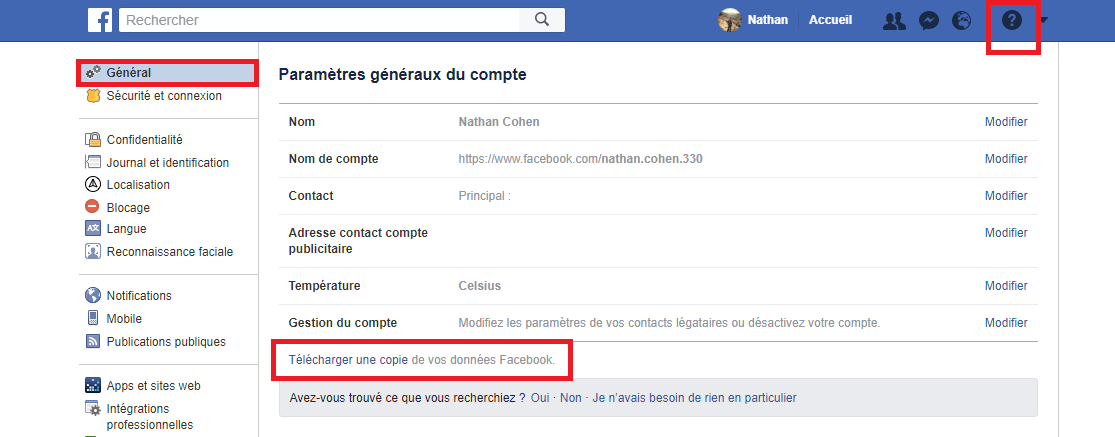
Facebook actually made it pretty simple, in two clicks you can get it.
Simply enter the parameters of your account and click on the “General” tab if you’re not already on it.
At the bottom of the page, you will find a sentence like “download a copy of your personal data”, that’s it !
You will then be asked to confirm your request by typing your password. The service will inform you that gathering your data can take some time ( it took around an hour for me ), and will inform you when it’s ready. Finally, you just have to click the new link they will send you and the download will start on your web-browser.
It’s probably easier to understand with a picture :
Accessing your data once downloaded
The data you downloaded from facebook comes inside of a zip file and can be a bit intimidating if you don’t know how to navigate it. The simplest option is to open the zip and open the first file called “index.htm”, it will open a local browser that will allow you to navigate through your data just like if it was a website.
Packages I used
Since all the data came in the form of html files, I used the amazing BeautifulSoup to parse through all of this. Later when I get to speech analytics and machine learning, I will also use nltk, gensim, and sklearn. All my visualizations were made using plotly because graph interactivity makes everything better and more understandable.
What did I do with the data ?
My most social year
For the first features, I decided to keep it simple and just parse through the dates of my friends list. The following results were computed regardless of who sent the invite.
Some yearly insights a posteriori
- I subscribed late in 2007, so not a lot of friendships there
- OH MY GOD 2009 WHAT HAPPENNED ? Oh right, that was my first year in CPGE, a very intense and very competitive curriculum in exact sciences and engineering. Students in this program are called “taupes”, which means “moles” as they never see the light of day because of the insane amount of work they have.
- 2012 saw me going out a lot for the first time in my life, I was enjoying the freedom of a regular learning pace at EPFL in Switzerland.
- 2014 was my second year serving in the military and I was making a lot of new friends on base and on permission.
- Overall it seems like this is going up and I’m becoming more social as the time goes, I guess it’s a good thing.
I’m trying to make the package as simple to use as possible, this graph was generated with just a one liner :
get_friend_hist()
I will add the possibility to show the plot in function of the months and days as well. That way, if anyone wants to have fun and try to correlate the amount of new friends they make with climate change through regression, they can !
My best friends !
Okay, best friends might be a bit of a stretch, even if this graph contains a lot of people very dear to my heart, it’s not exhaustive.
With some people I only interact through Whatsapp or through phone conversations, gathering data from external sources could help provide even better graphs.
The next graph is a histogram of the people with whom I conversed the most on Facebook with their name at the bottom of a column and the number of messages we sent each other on the y axis.
I’m not too surprised here, everyone on this list is ( or was ) a significant part of my life. Extra features will allow the creation of the same histogram for each year and month to allow more precise analysis of this data.
Let’s get personal
So far I kept this analysis on a pretty “wide-scale”, I didn’t focus on how or when I talked to people but more on how many people were my Facebook friends and when that happenned.
Let’s change that, I decided to create a function that will plot the number of messages sent by each party of a conversation over time.
Then again, as I tried to keep it simple, the function became :
plot_hist_conversation()
Here’s what it looks like when running this on a good friend of mine :
I can clearly see different periods in our friendship with Nyco, with a big spike when we lived together in Paris and talked a lot about “l’appart” ( the apartment ). Then more messages recently as he helped me through some web-dev projects and as we talked about his own project as well : geekin.
Hovering your mouse over the bars will allow you to see more specificaly how many messages were sent and by whom.
From this chart it looks like I’m quite the talker, but I beg to differ.
To prove my point, I created yet another function that simply shows the average length of the messages sent by someone :

Told you ! I’m not that talkative, I just like dynamic typing. When writing to someone and telling a story, if I know that the other person is actively reading my messages, I’d rather send multiple messages to make my story more lively than write a huge paragraph with punctuation.
But that’s me.
Since I already had all the messages sent by my friend, I went ahead and created yet another function to display a wordcloud of my friends speech, you can call it with:
create_wordcloud(friend_name,language)
Since I got friends with whom I speak in a few different languages, I had to add this extra ‘language’ argument to be able to filter correctly through each language’s stopwords.
Here’s Nyco’s wordcloud :
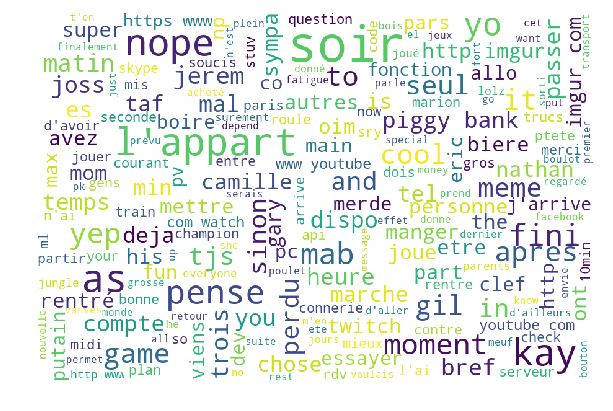
I told you we talked a lot about “l’appart”.
We need to go deeper !
This is where this stuff gets a little bit cooler/creepier/scarier.
Using a technique with which I’m pretty familar ( if you’ve been reading my articles on Medium or my other blog posts you should be familiar with it as well ), I managed to represent the 100 Facebook friends with whom I talk the most in a 3D space.
Here are a few things to keep in mind to understand this plot :
- Each point represents a person
- The color of each point represents their gender
- The coordinates of a point depend on the vocabulary used by this person
- If two points are close, they use similar phrasing/vocabulary
- For privacy reasons, I changed the names of my friends on this plot
Let’s not wait any longer.
You have a lot of options to play with the plot and familiarize yourself with it.
Doing so, you will realize that not everyone has been named “Friend_#”. As I had all the results with everybody’s name on it, some obvious clusters became quite distinct from the rest of the points.
Here are a few of them :
- There’s a separation between the left side and the right side.
- Left side is my english speaking friends
- Right side is my french speaking friends
- Middle is hebrew ( but I use Whatsapp when talking to my Israeli friends, so not much data here )
- A “Great Friend” cluster appears to be together on the upper right corner of the right side.
- An “Ex-gf cluster” appears quite clearly at the lower left corner of the left side ( I dated a few English speakers).
- A “ML-guy” cluster appears at the top middle part of the right side. ML is the acronym of my hometown and most of the guys in this cluster come from the same neighborhood, we all went to the same schools and had more or less the same friends. As such, it could be expected that we would have the same vocabulary.
Other insights
- It seems like the further a person is on the x axis, the closest they are to me. A study of the vector that created the x axis through PCA could help me understand which main words this axis represents.
- Each side has very little variance and could potentially be represented only in 2D for each language.
- Outliers are friends with particularly singular speech.
- Some of the points are quite close to the ex-gf cluster…
I’d like to talk about that last point a bit more as I think this is where I could leverage very interesting insights.
After reviewing the points that were the closest to the ex-gf cluster, I realized that my history with these girls was one of a missed shot. More clearly, these points represent people with whom I had a chance ( or just shortly dated ) and never took it, or never realized it. The same is true for some points “gravitating” around other clusters.
There’s definitely a tool here to help oblivious people ( like I was ) to realize when someone is interested in them.
Going further
Amongst the other extra features that I mentionned earlier, I’m also working on :
- Creating a time-dynamic 3D representation of my friends vocabulary to see how people get closer or further from cluster of interest ( someone evolving towards your best friends cluster or ex-gf cluster could mean something …)
- Sentiment analysis over time for each conversation to pinpoint arguments and happy moments for each person
- Response time measuring feature is still in beta but will prove to be interesting
- Using all these new generated data to further the clustering, classification, and prediction using social data
- Good friends lost from sight
- Identifying key-words in arguments/happy moments to predict them/make them happen
- Potential dating score using distance to the gf-cluster, gradient towards it, and more data !
As I wrote in the beginning of this article, I will release the code my Github as soon as it’s clean, modular, and efficient as some functions may still take a few minutes to run.
Thanks a lot for reading !