
I sneezed and now I can't move!

With lower back pain it's either you have it or you know someone who has it. Our increasingly sedentary lifestyle has led to some apalling figures when it comes to the subject of back pains.
According to thegoodbody.com, 8 in 10 Americans will experience back pain in their lifetime. They affect men almost as much as they affect women, reduce the ability to work, to focus, and are just unbearable. No need to convince anyone that lower back pain is a b****.
In this short study we'll try to get some leads on identifying the strongest factors causing lower back pain and we'll create models and representation to classify back pain as well as possible. To do so, we'll follow this clickable plan.
Introduction
About the Data
The data set that we are going to study compiles 309 observations of patients with and without lower back pains. It contains 12 different predictors with pretty complicated names but we'll try to explain the most relevant of these predictors as we progress through the study. It also contains 1 target feature called "Attribute" that will get the value "Abnormal" when lower back pain is present and "Normal" when everything is ? Normal, you guessed it.
The description of the data set explain a few of the reasons why lower back pain can occur :
- The large nerve roots in the low back that go to the legs may be irritated
- The smaller nerves that supply the low back may be irritated
- The large paired lower back muscles (erector spinae) may be strained
- The bones, ligaments or joints may be damaged
- An intervertebral disc may be degenerating
We'll see in the data set that we get mostly morphological/positional values, nothing directly telling us that one of the foremetionned things is happening but positional indicators that can definitely put us on the way. This data set does not contain any demographic information ( to my great regret ) about the subject observed. It would've been interesting as some of the values we're going to study typically change between men, women, and ethnicities.
Packages used
Might as well put everything in one line and be done with it, here's a list of what we will use here
# The classics
import numpy as np
import pandas as pd

# Visualisation tools
import seaborn as sns

import matplotlib.pyplot as plt
from mpl_toolkits.mplot3d import axes3d
from matplotlib import style

import plotly
from plotly.offline import iplot, init_notebook_mode
from plotly.graph_objs import Scatter3d, Layout, Figure

import graphviz

# Machine learning unavoidables
from sklearn.decomposition import KernelPCA, PCA
from sklearn.preprocessing import normalize,MinMaxScaler,PolynomialFeatures
from sklearn.discriminant_analysis import LinearDiscriminantAnalysis
from sklearn.tree import DecisionTreeClassifier
from sklearn import tree
from sklearn.model_selection import GridSearchCV, train_test_split, cross_val_score
from sklearn.linear_model import LogisticRegression
from sklearn.metrics import roc_auc_score
from sklearn.feature_selection import SelectKBest, chi2
Goals
Through this notebook, I want to be able to identify the key factors causing lower back pain as well and I want to be able to create understandable classifiers to further human understanding of the problem while keeping a good quality of classification.
I will try to explain my thought process and my decision as thouroughly as possible so that everyone can learn something from this notebook, would it be in the subject of data science or just about back pain.
Exploratory Data Analysis
# Defining the name of each column as it was given in the dataset
col_list = ['Pelvic_incidence',
               'Pelvic_tilt',
               'Lumbar_lordosis_angle',
               'Sacral_slope',
               'Pelvic_radius',
               'Degree_spondylolisthesis',
               'Pelvic_slope',
               'Direct_tilt',
               'Thoracic_slope',
               'Cervical_tilt',
               'Sacrum_angle',
               'Scoliosis_slope',
               'Attribute',
               'To_drop']

# Loading the data
data = pd.read_csv("../input/Dataset_spine.csv", names=col_list, header=1)

# The last column contained meta-data about the other columns and is irrelevant in our study
data.drop('To_drop', axis=1, inplace=True)


data.head()
# Checking for the integrity of the data is good practice
data.info()
Class Distribution
sns.set_style("white")
g=sns.factorplot(x='Attribute', hue='Attribute', data= data, kind='count',size=5,aspect=.8)

From a simple look, we could tell that the proportions are 2/3 Abnormal and 1/3 Normal which is actually quite unusual for medical data. Usually the Abnormal cases are extremely rare and this creates very skewed data sets. We don't have any information on how the dataset was gathered and created so unfortunately we can't really know why these numbers seem so unusual.
We'll get to the true count of each class later.
# Replacing our attribute with binary values :
data['Attribute'] = data['Attribute'].map({'Abnormal': 1, 'Normal': 0})
Correlations
I find it always interesting to plot a correlation map when possible. They are very simple and easily readable and can provide a tremendous amount of information in just a look.
sns.set(style="white")
d = data
corr = d.corr()
mask = np.zeros_like(corr, dtype=np.bool)
mask[np.triu_indices_from(mask)] = True
f, ax = plt.subplots(figsize=(11, 9))
cmap = sns.diverging_palette(220, 10, as_cmap=True)
g=sns.heatmap(corr, mask=mask, cmap=cmap, center=0,
            square=True, linewidths=.5, cbar_kws={"shrink": .5})

The first thing we want to look at is how our features are correlated with our target. As they are represented on the last line of this heatmap they are quite easy to see. This way we identify that :
- Pelvic_incidence
- Pelvic_tilt
- Lumbar_lordosis_angle
- Sacral_slope
- Pelvic_radius
- Degree_spondylolisthesis
Are all strongly correlated with our target values, with Degree_spondylolisthesis being the strongest one and Pelvic_radius being a negative correlation.
Secondly, we might want to look at other correlations, maybe some features are completely correlated and redundant, thus, not that usefull in a classification problem...
The strongest correlations that I see between predictors is the one between Sacral_slope, Pelvic_Tilt, and Pelvic_incidence, we will definitely look into that later.
Hold down to you hats because it gets fancier, the package seaborn comes with a great tool to visualize more accurately the correlation inside of a dataset.
More correlations !
sns.pairplot(data, hue="Attribute")
plt.show()

It may seem a bit much at first sight, but taking each cell independently this graph is actually very understandable and holds even more information than the correlation map we plotted before.
As I was about to plot this I was somewhat hoping for a holy grail of classification, a natural feature that would separate almost perfectly the two classes of attributes, but alas it wasn't here... But it doesn't mean that this graph was for nothing.
It shows us more or less some kind of linear relations between the first 6 columns of the data set.
It also shows us the distribution of these 6 first columns and the separation that appears there between Normal and Abnormal albeit not perfect but always useful.
Shallow tree intuition
Granted, we got to look at pretty much everything above and we got a pretty good hunch of which parameters were going to be important and which were not.
But looking is not knowing. Thus, to get a deeper, more explainable intuition, we will create a graph for a shalllow decision tree. Because it is shallow the computation time and memory needed will be very small ( even though for a 309*12 matrix this isn't our strongest concern), and it will only retain the most relevant factors.
On a side note, I think this is great practice to do this to familiarise yourself with a dataset in a simple way.
# Creating the arrays
X = data.iloc[:,:-1]
y = data.iloc[:,-1]

# Creating the shallow decision tree
clf = DecisionTreeClassifier(max_depth=3)

# Fitting the decision tree to the data set
clf = clf.fit(X, y)

# Plotting the results
dot = tree.export_graphviz(clf,out_file=None,
                         feature_names=col_list[:-2],
                         class_names=['Normal','Abnormal'],
                         filled=True, rounded=True,
                         special_characters=True)
graph = graphviz.Source(dot)
graph.render("back problems")
graph
A true beauty that's for sure, but what do we get out of it ?
- Degree_spondylolisthesis is definitely a key factor in the understanding of lower back pain
- Sacral_slope is our second best split and will provide great information as well
- Cervical_tilt and Pelvic_radius seems interesting as well
I started this study with little domain knowledge, but I believe that cervical tilt refers to the upper vertabraes of the spine. We are talking about lower back pain but it is also possible that the cervical tilt would be a result of other displacements lower in the spine.
Univariate exploration of relevant factors
Degree spondylolisthesis
Spondylolisthesis is derived from the Greek words “spondy”, meaning vertebra, and “listhesis”, meaning movement. Spondylolisthesis is an abnormal condition in which there is instability in the spinal column, as one vertebral body is shifting forward over the next vertebrae.
 Pardon my French, more simply, the degree of spondylolisthesis measures ( more or less ) how much a vertebra has slipped from its original position.
Let's see how it is distributed among the classes.
# A simple reusable function to plot the distribution of one feature with different colours for each class
def hist_graph(column):
    a4_dims = (11.7, 8.27)
    fig, ax = plt.subplots(figsize=a4_dims)
    sns.distplot(data[data['Attribute']==1][column], color='r')
    sns.distplot(data[data['Attribute']==0][column],ax=ax, color='b')

hist_graph('Degree_spondylolisthesis')

# A simple and reusable function to show the numbers in a dataframe
def compare_df(column):
    norm = data[data['Attribute']==0][[column]].describe()
    abnorm = data[data['Attribute']==1][[column]].describe()

    df = pd.DataFrame(data = norm)
    df['Normal'] = df[column]
    df.drop(column, axis=1, inplace=True)
    df['Abnormal']= abnorm
    return df

compare_df('Degree_spondylolisthesis')
For the Normal class :
- The population is centered around 1.15.
- Small standard deviation showing a very centered classs (just see the histogram).
- The minimum value for the Normal class is lower than the minimum value for the Abnormal class showing that the degree spondylolisthesis doesn't have the same influence on back pains for a positive or for a negative displacement.
- The maximum value seems a bit high but since 75% of the Normal population is under ~5, these cases could be either outliers, or show that other factors can maybe compensate for the degree spondylolisthesis.
For the Abnormal class :
- Both the mean and median are above the Normal's class maximum at respectively ~38 and ~32.
- High standard deviation showing a wide spread of the values and of the resulting issues.
- Still goes down in the negative values, then again showing little influence of this parameter once below zero.
- We'll take a closer look at that guy with the max value of 418...
Sacral slope, Pelvic incidence, and Pelvic tilt
The sacral slope is the angle between a horizontal plane and the upper surface of the sacrum. The sacrum is the last bone in our spine where the 5 vertebraes have fused together to create one bone. At the end of the sacrum, we can find the coccyx, remnant bone of what used to be a tail for human beings.
The sacral slope is closely related to the pelvic incidence and to the pelvic tilt by definition :
$$ \text{Pelvic Incidence} = \text{Pelvic Tilt} + \text{Sacral Slope} $$
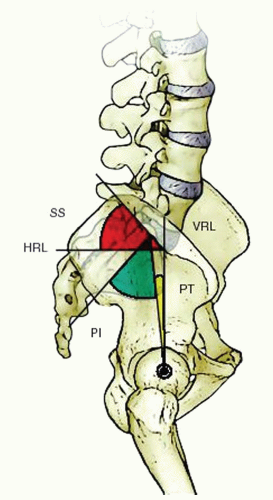
We don't have any information on the ethnicity of the patients in this data set, but it is good to notice that different values are found among different ethnicities for the sacral slope, this will help explain for variations of values that would seem abnormal otherwise. This is not only true for ethnicities but also for genders... A shame that we don't have any demographic data really.
Sacral slope distribution
hist_graph('Sacral_slope')

compare_df('Sacral_slope')
Not much stands out from the observation of the sacral slope alone. The Abnormal class usually has a slightly higher sacral slope than the normal class but it stays within one standard deviation of the Normal class.
One thing we can notice is that then again, the Abnormal class is more widely spread than the Normal class and that we have among the Abnormal class one ( or several ) outliers around 120.
Pelvic incidence distribution
hist_graph('Pelvic_incidence')

compare_df('Pelvic_incidence')
Same thing as before, Normal class is more centered and usually lower than the Abnormal class which is again more widely spread.
As we saw in the pairplot drawn earlier, there is almost never in this data set one single factor that will allow us to determine the normality or abnormality of a patient, but combinations of these parameters through feature engineering may help, even a human to tell at first glance the status of a patient.
Pelvic tilt distribution
hist_graph('Pelvic_tilt')

compare_df('Pelvic_tilt')
A slight shift to the right for the Abnormal class that is again more widespread than the Normal one.
- While the Normal class seems to follow a Gaussian Distribution, the Abnormal class seems to follow more of a Poisson distribution with its longer tail on the right.
- Every case with a Pelvic tilt about 29.89 will be classified as Abnormal.
- Negative values show little impact by themselves.
Pelvic radius
The pelvic radius is the angle formed between a vertical plane and the hip-axis/posterior superior corner of S1 ( first element of the sacrum ) line.

Let's take a look at the distribution of the pelvic radius amon the different classes.
hist_graph('Pelvic_radius')

compare_df('Pelvic_radius')
This is the first time that we are seeing the Abnormal class shifted to the left compared to the Normal class.
- Both have almost normal distributions, as per usual.
- The Abnormal class is still more widespread than the Normal class.
- The Normal class distribution is entirely contained into the Abnormal class distribution, giving us a lower and upper bound for the Normal class between ~100.5 and ~147.9.
Lumbar lordosis angle
The lumbar lordosis angle is the angle formed by the intersection of two planes.
- The first plane is the one created following the upper surface of the L1 vertebra.
- The second plane is created by following the upper surface of the S1 vertebra.
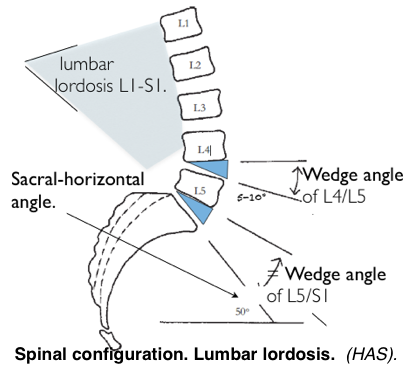
Let's see its distribution.
hist_graph('Lumbar_lordosis_angle')

compare_df('Lumbar_lordosis_angle')
We recognize here what we've been seeing previously in the most of the other parameters that we have studied.
- Higher values for the Abnormal class ( right-shift ).
- Higher spread for the Abnormal class.
- Normal class almost contained by the Abnormal class, giving us here just an upper bound where all patients with above ~90 wil be classified as Abnormal.
Looking at the pairplot and at the correlation graph, we have drawn the most relevant distributions so far. The others parameters present very similar distribution for both Normal classes and Abnormal classes and their univariate study would not give us much insight.
Both our correlation plot and the shallow decision tree we used gave us an idea of what parameters were the most relevant to determine the Attribute of a patient. Let's try to create a new variable from the previous ones that will have even more weight for the predictions.
Feature Engineering
Feature engineering is the process of creating new features from data to achieve better modelisation of the problem. It can be done before or after fitting the dataset to a simple model to see how each feature would impact on the quality of the model, but in the case of binary classification, we will see clearly in the histogram distribution if a new feature helps to separate the classes even more. There are lots of ways to generate new features :
- From domain knowledge
- From observation of the data
- From dimensionality reduction techniques such as PCA
- Just creating combinations of our current parameters
Now, I have no domain knowledge, and let's assume that we haven't really looked at the data yet for the fun of it, we'll try to create new features through PCA, LDA and polynomial combinations of our parameters
PCA
In simple words, Principal Component Analysis or PCA tries to create linear combinations of the features in our data set to represent its variance as well as possible.
For us, it can be a tool to try to create a feature that will separate the target as well as possible. That is, if PCA manages to represent the data set accurately.
# Feature scaling
sc = MinMaxScaler()
X_std = sc.fit_transform(X)

# Creating the PCA
pca = PCA(n_components=3)

# Fitting the PCA to the data set
pca.fit(X_std)
A good way to verify the quality of the PCA is by checking its explained_variance. This will show how much of the variance of the dataset the PCA manages to express for each of its component, thankfully our PCA object has a method .explained_variance_ratio_that does exactly this.
pca.explained_variance_ratio_
So this is pretty terrible to be honest.
Even after adding the three components together we don't even get to 50% of explained variance for the data set...
It doesn't mean that we should throw PCA away for this problem, other implementations of the PCA with the kernel trick ( kPCA in sklearn ) are also available, but I want to keep this notebook somewhat short so you'll have to look up this one by yourself.
Polynomial Features
Creating new features from polynomial combinations and then filtering through them is also way of doing feature engineering. That being said, using PolynomialFeaturescan be computationally expensive and slow. The reason behind this is that it is going to create all the combinations possible between all the selected features, including ( if you wish so ) power features from the previous ones ( understand squared, cubed, etc.) .
Here I specified that I wanted a maximum degree of 2 and I have 12 parameters.
I can expect:
- ${12 \choose 2}=66$ New interacting features,
- $12*1=12$ Squared features, and
- $12$ of our old features.
That gives us a total of 90 features, let's check it.
PF = PolynomialFeatures(degree=2, include_bias=False)
X_std_pf= PF.fit_transform(X_std)
new_feats = PF.get_feature_names()
X_std_pf.shape
Everything checks out with what I thought and that's great, but more features doesn't always mean a more accurate model. Some of them will introduce noise, some of them will make us overfit, some of them are just straight out bad.
Now there are a lot of different methods to evaluate the quality of a given feature in regards to its target, and a lot of them happen actually after fitting an algorithm to the new data set and seeing an improvement or a loss in the quality of the algorithm ( here we will measure the quality of a classifier via the roc-auc value).
For the moment I will focus on trying to evaluate the quality of the new features a priori following the $\chi^2$ evaluation of these features and by keeping only the 10 best results.
Kbest =  SelectKBest(chi2, k=10)
X_std_pf_chi10 = Kbest.fit_transform(X_std_pf, y)
selected = Kbest.get_support()
features=[]
for feat, sel in zip(new_feats, selected) :
    if sel == True :
        features.append(feat)

feat_col=[]
for i in features :
    split = i.split()
    if len(split)==1 :
        pow = split[0].split('^')
        if len(pow) == 1:
            nb =int(''.join([j for j in pow[0] if j.isdigit()]))
            col=data.columns[nb]
            feat_col.append(col)
        else :
            nb =int(''.join([j for j in pow[0] if j.isdigit()]))
            col=data.columns[nb]+'^'+pow[1]
            feat_col.append(col)
    else:
        clean =''.join([j for j in i if j.isdigit()])
        col=data.columns[int(clean[0])]+'*'+data.columns[int(clean[1])]
        feat_col.append(col)
The feature selected by the $\chi^2$ are as follow :
feat_col
Boxing Features
It is another technique that can be used to create new features. To do this we use the things we learned through our previous EDA to create new categorical features telling us if a value is above, below, or in between certain values.
For example, when we were looking at the distribution of the Sacral_slope amongst the classes, we realised that there was no Normal patient with a Sacral_slope value above 67.
Thus, we can create a category 'ss>67' that would take 1 as a value if it is True and 0 if it is False.
Let's try to implement a few of these boxing features.
box_deg = (data.Degree_spondylolisthesis > data[data['Attribute']==0].Degree_spondylolisthesis.max()).map({False: 0, True: 1})
box_ss  = ((data.Sacral_slope > data[data['Attribute']==0].Sacral_slope.max()) & (data.Sacral_slope > data[data['Attribute']==0].Sacral_slope.min())).map({False: 0, True: 1})
box_pi  = (data.Pelvic_incidence > data[data['Attribute']==0].Pelvic_incidence.max()).map({False: 0, True: 1})
box_pt  = ((data.Pelvic_tilt > data[data['Attribute']==0].Pelvic_tilt.max()) & (data.Pelvic_tilt > data[data['Attribute']==0].Pelvic_tilt.min())).map({False: 0, True: 1})
box_pr  = ((data.Pelvic_radius > data[data['Attribute']==0].Pelvic_radius.max()) & (data.Pelvic_radius > data[data['Attribute']==0].Pelvic_radius.min())).map({False: 0, True: 1})
box_lla = ((data.Lumbar_lordosis_angle > data[data['Attribute']==0].Lumbar_lordosis_angle.max()) & (data.Lumbar_lordosis_angle > data[data['Attribute']==0].Lumbar_lordosis_angle.min())).map({False: 0, True: 1})
X_box = np.array([box_deg,box_ss,box_pi,box_pt,box_pr,box_lla]).reshape(309,6)
# Adding the boxing features to the other ones
X_std_box = np.hstack([X_std,X_box])
X_std_pf_chi10_box = np.hstack([X_std_pf_chi10,X_box])
Effect on a simple model
Now that we have created these new features and these new sets of predictors, we would like to see their effect on the AUC of a simple classifier, since we used a Decision Tree earlier, we'll keep using it for simplicity reasons.
Because the scores can have a high variance due to the randomization of some factors in the construction of the algorithm, the training data, and the testing data, we will cross-validate all the results we have to stabilize this variance and get insights from these results.
# Creating a list through which we'll iterate the Decision Tree
X_list=[X_std, X_std_pf, X_std_pf_chi10,X_std_box, X_std_pf_chi10_box]
results = []

clf = DecisionTreeClassifier(random_state=42)

# Getting cross-validated scores for each of the new data sets
for X_set in X_list :
    clf.fit(X_set,y)
    y_pred = clf.predict(X_set)
    rez = cross_val_score(clf, X_set, y, scoring='roc_auc', cv=100 )
    results.append(rez.mean())
results
Let's take a look at the results above and try to understand them a little bit.
- The standard data set allows for a CV-AUC of 70.75%
- After adding 88 polynomial features it goes up ~2.25%
After adding the boxing features it goes up ~2.5%
Filtering the polynomial features with the standard data set make it go up by ~4.5%
- Adding the boxing features make the latter go up ~2.25%
First of all, even though this is cross validated and verified and all, after running it multiple times I was still getting a variance higher than I'd like on my results, so this is to take with a grain of salt. One thing that systematically came back though was the fact that either the filtered polynomial features or the filtered polynomial features + boxing would get the highest scores.
As we expected, the creation of polynomial features increased the base score, but not from much... How so ? It was certainly introducing a lot of noise and useless extra feature, this explanation is backed by the facte that once filtered through the $\chi2$ the score goes up drastically.
I am quite satisfied with the effect of the boxing features on the AUC score. Compared to the computational power required to first create all the polynomial features and then filter them, creating the boxing features was a walk in the park and their effect was definetely non negligeable on the outcome.
Now I want to keep this dataset simple without too many features, and even if the score is slightly better once the boxing features are added, I will use the filtered polynomial features without the boxing features for the modelling part of this notebook.
Here are the winning predictors with the targe in a DataFrame :
df_new = pd.DataFrame(X_std_pf_chi10, columns=feat_col)
df_new['Attribute'] = data['Attribute']
df_new.head()
Modelling
Choosing Interpretability
Some machine learning models can help people understand a problem more fully or in a different manner through the way they are constructed. These models are interpretable .
Their decision process can be easily showed and understood to a human. Interpretable models can provide great insight, this is exactly what we did in the first part when building a shallow decision tree to then examine its decision process. Thanks to the shallow decision tree, we knew immediatly what parameters were the most relevant to our problem.
One drawback is that most of the time these models are inherently more simple than others "black-box" models, and their results usually can't compare to more complex algorithms that lose in interpretability.
In this part, we will use a Decision Tree and a Logistic Regression algorithm, tune them to maximize AUC, and interpret their architecture or coefficients.
Decision tree
The last time we used a Decision Tree with the newly engineered features we had an AUC ~80% . Now we want to get a better result and tune the algorithm to maximize the AUC. To do so, we will use the GridSearchCV from sklearn. It allows the construction of a parameter grid that will be applied and tested on the metrics we have specified ( in our case AUC ). Now, one has to be careful with GridSearch as it will train as many models as there are combinations of parameters in the parameter grid. That means it can take some time and can be computationally expensive. Since the data set is pretty small here, there is no problem with testing a few parameters at the same time. Once the GridSearch has finished testing everything, we look for the best parameters and ta-da, we tuned our algorithm.
param_grid = {'max_depth': np.arange(1, 10),
             'min_samples_leaf' : np.arange(1, 10),
             'max_features' : ['auto','sqrt','log2',None],
             'random_state' : [37,]}

trees = GridSearchCV(DecisionTreeClassifier(), param_grid, scoring='roc_auc')
trees.fit(X_std_pf_chi10, y)

print("The best parameters are : ", trees.best_params_,' giving an AUC : ', trees.best_score_)
Since our untuned Decision Tree, we got a significant increase for the AUC.
As we've seen in an earlier part of this notebook, one of the greatest things with Decision Tree is that we can actually plot their architecture on a simple graph and interpret the results directly. This is exactly what we are going to do here :
clf_tree = trees.best_estimator_

dot = tree.export_graphviz(clf_tree,out_file=None,
                         feature_names=df_new.columns[:-1],
                         class_names=['Normal','Abnormal'],
                         filled=True, rounded=True,
                         special_characters=True)
graph = graphviz.Source(dot)
graph.render("back problems2")
graph
From the top to the bottom we go from the most important parameters to the least important ones ( in regards to the Decision Tree algorithm ).
As such :
- Degree_spondylolisthesis * Pelvic_incidence is the most influencial factor towards having back problems ( we've seen this result previously )
- Degree_spondylolisthesis is the second one
If you paid attention to all the parameters we were using, you probably realised that some parameters were missing from this tree.
The Decision Tree as implemented in sklearn also comes with a method : .feature_importances. The name is pretty self-explanatory, let's dig into this.
clf_tree.feature_importances_
We see that five values are set to 0, they correspond to the columns :
- Pelvic_incidence * Pelvic_tilt
- Pelvic_tilt^2
- Pelvic_tilt * Degree_spondylolisthesis
- Lumbar_lordosis_angle^2
- And Lumbar_lordosis_angle * Degree_spondylolisthesis
This isn't a mistake, it is simply due to the shallowness of the tree. Remember, the best parameters set a 'max_depth': 3. With a deeper tree, these features would get a non-zero value for their importance, but probably still pretty close to zero. The fact that while doing GridSearch we got the best results for a shallower tree may show that the inclusion of the current zero features would have lead to overfitting the data set and thus reduce the AUC.
Logistic Regression
We're also going to use GridSearchCV to optimize the AUC of the Logistic Regression, but the difference with the Decision Tree is that this time we will interpret the coefficients given to each feature by the algorithm instead of interpreting the architecture of it.
param_grid = {'penalty': ['l1','l2'],
             'tol'     : [1e-5, 1e-4, 1e-3, 1e-2],
             'C'        : [1.0, 10.0, 25.0, 50.0, 100.0, 200.0, 500.0, 1000.0] ,
             'solver'    : ['liblinear',  'saga'],
             'random_state' : [37,],
             'max_iter' : [700,]}

logit = GridSearchCV(LogisticRegression(), param_grid, scoring='roc_auc',verbose=0)
logit.fit(X_std_pf_chi10, y)
print("The best parameters are : ", logit.best_params_,' giving an AUC : ', logit.best_score_)
For the tuned Logistic Regression, we get an AUC of ~87.3%, not bad.
Let's see how we got to this result and check out the coefficient of each feature.
clf = logit.best_estimator_
clf.coef_
The array above represents the coefficients given to each of the parameters inside of the logistic regression. Their absolute value give an idea of the influence of each parameter while their sign tells us in which way they will influence the outcome.
As such :
- Degree_spondylolisthesis * Pelvic_incidence is the most influencial factor towards having back problems ( we've seen this result previously )
- Degree_spondylolisthesis is the second one
- Pelvic_incidence * Pelvic_tilt_angle is the most influencial factor towards not having back problems closely followed by
- Pelvic_tilt * Degree_spondylolisthesis .
This information from the Decision Tree and from the Logistic Regression could help a practitioner decide the severity of one case or help define more specifically what the problem is and how to fix it for example.
It is interesting to notice that the two classifiers don't necessarily "agree" on the importance of each feature. This is due to the different way they compute and classify each case and hence fit to the data set. That being said, combining the interpretation of these different models can help refine even more our understanding of the problem on a human base.
Visualisations
I have beeng playing with plotly for a while now and I really find that the interactivity of the plots adds so much to the reading and understanding experience of this very plot. It allows also to single out and identify outlier points in many cases for extended study later.
We'll see some outlier points in the next visualisations in which a medical practitioner could be interested.
If this patient is classified as normal, why is he so far from the normal cluster of points ?
In one of my previous studies, after using an auto-encoder to perform dimmensionality reduction, I was able to redefine and create new classifications for a disease.
As such, I believe that the study of different visualisations of the data sets through dimensionality reduction can also carry a great values
PCA on the new data
init_notebook_mode(connected=True)

X = df_new.iloc[:,:-1]
y = df_new.iloc[:,-1]

pca = PCA(n_components = 3)
X_PCA = pca.fit_transform(X)

xs = X_PCA[:,0]
ys = X_PCA[:,1]
zs = X_PCA[:,2]

# Recreating the df with the new coordinates
df = pd.DataFrame(dict(x=xs, y=ys, z=zs, Attribute=y))
l = []
names = ['Normal','Abnormal']

for i in [0,1]:
    trace= Scatter3d(
        x= df[df['Attribute']==i]['x'],
        y= df[df['Attribute']==i]['y'],
        z= df[df['Attribute']==i]['z'],
        mode= 'markers',
        marker= dict(size= 5,
                    line= dict(width=1),
                    color= i,
                    colorscale='Jet',
                    opacity= 0.8
                   ),#name= y[i],
        name = names[i],
        text= df[df['Attribute']==i].index,# The hover text goes here...
        hoverinfo = 'text+name'
    )

    l.append(trace)

layout= Layout(
    title= '3D Representation of the patients characteristics using PCA',
    hovermode= 'closest',
    showlegend= True)

fig= Figure(data=l, layout=layout)
plotly.offline.iplot(fig)
print('The PCA explains the variance of the data by {:3f}%'.format(100*pca.explained_variance_ratio_.sum()))
This time, PCA has performed very well, we can see that by the high explained variance ratio that was computed with only 3 components.
Now what can we see from this ?
- The normal class is somewhat clustered together with a few outlier points
- Some points in the abnormal class are mixed within what seems to be the normal cluster, that shows us overall similarity to the normal points with probably just one factor making them abnormal ( certainly the Degree Spondylolistehsis )
- The abnormal class is very spread out, we can assume that the points the fursthext from all the other poiunts are extreme cases with extreme values.
TSNE
from sklearn.manifold import TSNE
tsne = TSNE(n_components=3,learning_rate=115.0)
X_tsne = tsne.fit_transform(X, y)


xs = X_tsne[:,0]
ys = X_tsne[:,1]
zs = X_tsne[:,2]

# Recreating the df with the new coordinates
df = pd.DataFrame(dict(x=xs, y=ys, z=zs, Attribute=y))
l = []
names = ['Normal','Abnormal']

for i in [0,1]:
    trace= Scatter3d(
        x= df[df['Attribute']==i]['x'],
        y= df[df['Attribute']==i]['y'],
        z= df[df['Attribute']==i]['z'],
        mode= 'markers',
        marker= dict(size= 5,
                    line= dict(width=1),
                    color= i,
                    colorscale='Jet',
                    opacity= 0.8
                   ),#name= y[i],
        name = names[i],
        text= df[df['Attribute']==i].index,# The hover text goes here...
        hoverinfo = 'text+name'
    )

    l.append(trace)

layout= Layout(
    title= '3D Representation of the patients characteristics using TSNE',
    hovermode= 'closest',
    showlegend= True)

fig= Figure(data=l, layout=layout)
plotly.offline.iplot(fig)
I always liked the results of a t-SNE dimensionality reduction...
Compared to the results we've had for the PCA, the separation between clusters makes itself clearer. Yet we still have an important mix of classes in what should be the normal cluster. It is interesting to note that the outlier points in this representation are not the same as the outlier points we've had using the PCA. Different techniques different results, but it would still be interesting to compare these outlier points wioth the rest of the data set.
Spectral Embedding
from sklearn.manifold import SpectralEmbedding

SE = SpectralEmbedding(n_components=3)
X_SE = SE.fit_transform(X, y)


xs = X_SE[:,0]
ys = X_SE[:,1]
zs = X_SE[:,2]

# Recreating the df with the new coordinates
df = pd.DataFrame(dict(x=xs, y=ys, z=zs, Attribute=y))
l = []
names = ['Normal','Abnormal']

for i in [0,1]:
    trace= Scatter3d(
        x= df[df['Attribute']==i]['x'],
        y= df[df['Attribute']==i]['y'],
        z= df[df['Attribute']==i]['z'],
        mode= 'markers',
        marker= dict(size= 5,
                    line= dict(width=1),
                    color= i,
                    colorscale='Jet',
                    opacity= 0.8
                   ),#name= y[i],
        name = names[i],
        text= df[df['Attribute']==i].index,# The hover text goes here...
        hoverinfo = 'text+name'
    )

    l.append(trace)

layout= Layout(
    title= '3D Representation of the patients characteristics using Spectral Embedding',
    hovermode= 'closest',
    showlegend= True)

fig= Figure(data=l, layout=layout)
plotly.offline.iplot(fig)
Now that's a funny shape...
This is the clearest classes separation we've seen here. The "nose" that comes out seems very class pure with only 3 points classified as normal in a cluster of only abnormal points. In this case, studying these points included in the abnormal cluster could also provide insight on this special cases. But there is much more that we can do with this !
See the triangular shape of the "base" ? We could study how the different characteristic of a patient change depending on which tip of the triangle is the closes to him, giving yet another visual representation of possible sub-classes in the back pains.
We still see that the normal points anre mixed in with the abnormal points, that reinforces my hypothesis that some abnormal points were classified as such just becasue of one single parameter that was too high, something to look into...
Conclusion
I hope you enjoyed reading this notebook as much as I have enjoyed writing it, feel free to get inspired from it and use the code in your own notebooks, I'd love to see what others make of it.